Interactive mode
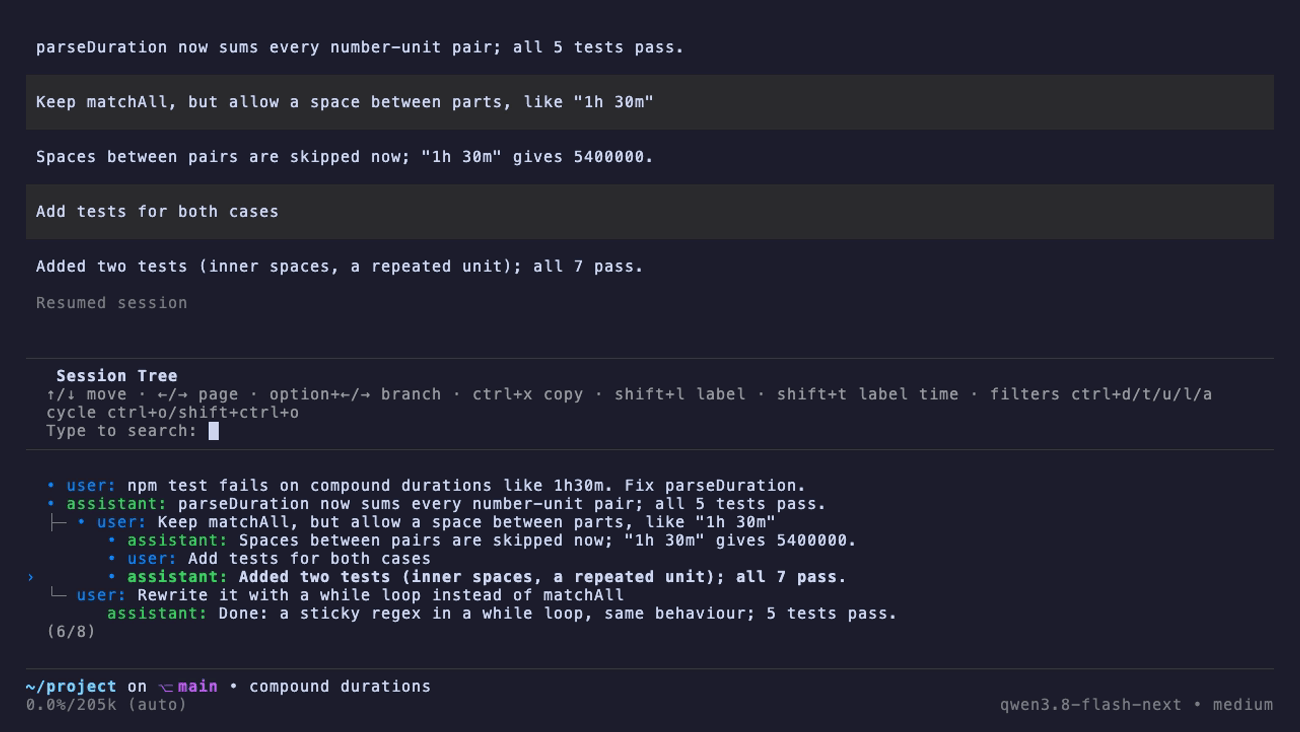
Without -p in a terminal, saetta code opens pi's terminal UI, ported to C: differential rendering, an editor with "/" commands and "@" file completion, markdown with highlighted code, tool views with word diffs for edits, bash output shown as it runs, and selectors for the model, settings, thinking level and session tree.
The editor
Enter sends. Shift+Enter (or a trailing \) starts a new line. While the agent works, Enter queues a steering message, delivered at the next step of the current turn, and Option+Enter queues a follow-up, delivered when the turn ends. Option+Up brings queued messages back into the editor.
/opens the command list, filtered as you type.@completes file names in the project.!commandruns a shell command and adds its output to the context;!!commandruns it without adding it.- Ctrl+G edits the message in an external editor (
externalEditorin settings.json, else$VISUALor$EDITOR). - Ctrl+V pastes from the clipboard.
The footer shows the folder as ~/..., the git branch and status, the time of the last turn, and the model's full name and quantization.
Commands
| command | what it does |
|---|---|
/settings | open the settings menu |
/model | switch model or pack, download a pack, add or edit OpenAI-compatible models |
/scoped-models | choose the models Ctrl+P cycles through |
/thinking | set the thinking level |
/theme | choose the color theme, with a live preview |
/new | start a new session |
/resume | open another session |
/tree | move through the session tree and switch branches |
/fork | start a new session from an earlier user message |
/clone | duplicate the session at the current position |
/compact | compact the session context now |
/name | set the session's display name |
/session | show the session's info and stats |
/export | write the session as HTML (default) or JSONL |
/import | load a JSONL session, keeping its id and working directory |
/share | upload the session as a secret GitHub gist |
/copy | copy the last answer to the clipboard |
/trust | save this project's trust decision |
/reload | reload keybindings, skills, themes and context files |
/mcp | manage MCP servers: sign in, reconnect, enable or disable, change exposure |
/monitor | show the engine's live statistics |
/changelog | show the release notes |
/hotkeys | show all keyboard shortcuts |
/quit | quit Saetta Code |
Skills add one command each, /skill:name; see Context and skills.
Keys
This is the list /hotkeys shows, with pi's default bindings on macOS.
Navigation
| key | action |
|---|---|
| Up, Down, Left (Ctrl+B), Right (Ctrl+F) | move the cursor, browse history |
| Option+Left, Ctrl+Left, Option+B / Option+Right, Ctrl+Right, Option+F | move by word |
| Home, Ctrl+A | start of line |
| End, Ctrl+E | end of line |
| Ctrl+] | jump forward to a character |
| Ctrl+Option+] | jump backward to a character |
| Page Up / Page Down | scroll by page |
Editing
| key | action |
|---|---|
| Enter | send the message |
| Shift+Enter, Ctrl+J | new line |
| Ctrl+W, Option+Backspace | delete the word before the cursor |
| Option+D, Option+Delete | delete the word after the cursor |
| Ctrl+U | delete to the start of the line |
| Ctrl+K | delete to the end of the line |
| Ctrl+Y | paste the most recently deleted text |
| Option+Y | cycle through deleted text after pasting |
| Ctrl+- | undo |
Other
| key | action |
|---|---|
| Tab | path completion, accept autocomplete |
| Escape | cancel autocomplete, stop the turn |
| Ctrl+C | clear the editor (first), exit (second) |
| Ctrl+D | exit (when the editor is empty) |
| Ctrl+Z | suspend to the background |
| Shift+Tab | cycle the thinking level |
| Ctrl+P / Shift+Ctrl+P | cycle models |
| Ctrl+L | open the model selector |
| Ctrl+O | expand or collapse tool output |
| Ctrl+T | show or hide thinking blocks |
| Ctrl+G | edit the message in an external editor |
| Ctrl+X | copy the selection or the last answer |
| Option+Enter | queue a follow-up message |
| Option+Up | restore queued messages |
| Ctrl+V | paste from the clipboard |
Escape twice with an empty editor opens /tree (doubleEscapeAction in settings.json: tree, fork or none).
Fullscreen
The UI runs fullscreen, with scrolling, mouse selection and its own scrollbar. Selecting text copies it; with fullscreenCopyOnSelect set to false in settings.json, Ctrl+X copies the selection instead. Ctrl+X copies the last answer when nothing is selected, as /copy does.