Models and providers
Saetta Code talks to a model in one of three ways:
- A Saetta pack loaded inside the agent's process (the default with
saetta start code). - A running Saetta server on this Mac.
- Any OpenAI-compatible chat completions server listed in
models.json.
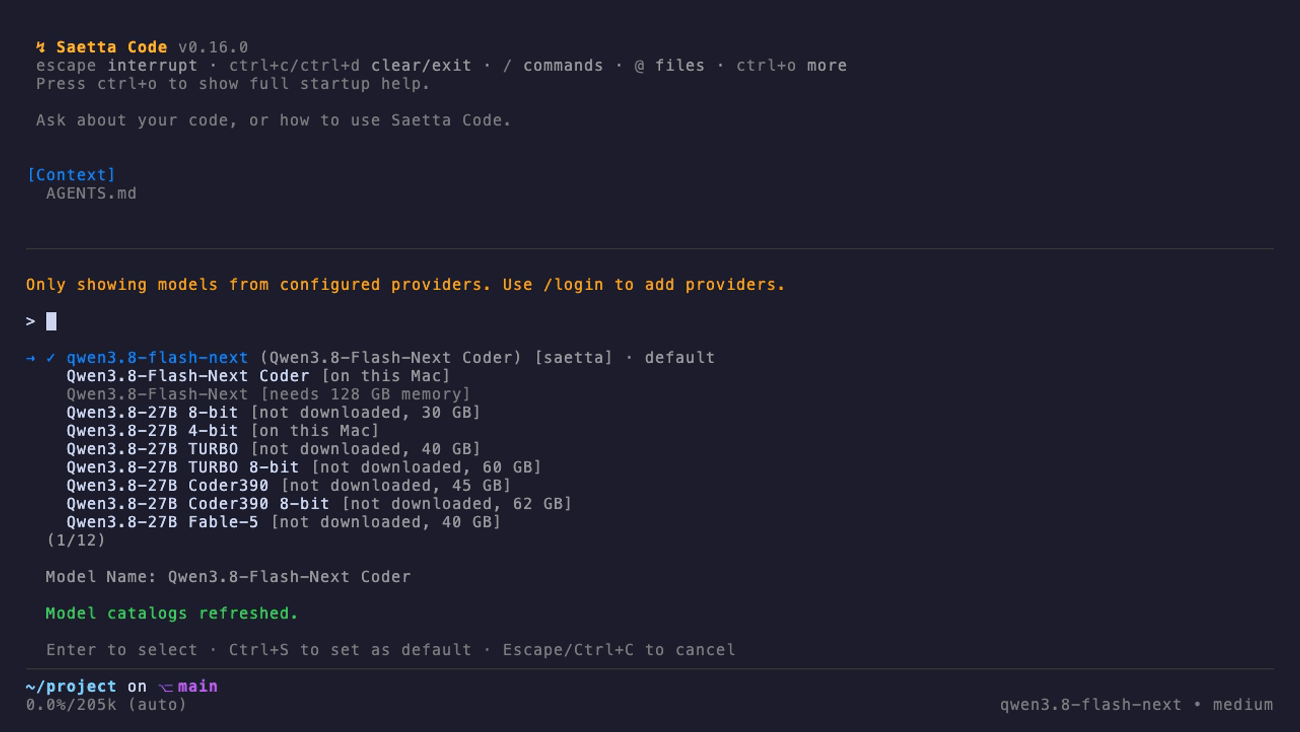
/model
/model lists everything the agent can use: the packs downloaded on this Mac, the packs it can download (with their size and the free disk shown first; a pack too big for this Mac's memory is greyed out), a running Saetta server, and the models in models.json. Picking a pack switches to it in the running agent. From the same list you can add, edit or remove an OpenAI-compatible model.
/model provider/id switches without the list, and Ctrl+L opens it.
From the command line:
saetta code --pack coder                          # a pack, in this process
saetta code --pack ~/Models/my-pack --ctx 65536   # a pack folder, with a smaller context
saetta code --provider saetta --model qwen3.8-flash-next
saetta code --model myprovider/my-model:high       # a models.json entry, thinking high
A model given as provider/id can end in :level to set the thinking level. Without --model, the agent uses defaultProvider and defaultModel from settings.json, which /model updates when you switch.
models.json
Providers are pi's models.json in the agent folder. Saetta Code uses providers whose api is openai-completions. This is the entry saetta start writes for the local server:
{
  "providers": {
    "saetta": {
      "baseUrl": "http://127.0.0.1:8080/v1",
      "api": "openai-completions",
      "apiKey": "saetta",
      "compat": {
        "supportsDeveloperRole": false,
        "supportsStore": false,
        "supportsReasoningEffort": false,
        "maxTokensField": "max_tokens",
        "thinkingFormat": "qwen-chat-template"
      },
      "models": [{
        "id": "qwen3.8-flash-next",
        "name": "Qwen3.8-Flash-Next (saetta)",
        "reasoning": true,
        "input": ["text"],
        "contextWindow": 204800,
        "maxTokens": 32768,
        "cost": { "input": 0, "output": 0, "cacheRead": 0, "cacheWrite": 0 }
      }]
    }
  }
}
Another provider is added next to it with its own baseUrl, apiKey and models. contextWindow sets when compaction starts, reasoning whether thinking levels apply, and compat the request fields the server understands.
API keys
apiKey (and header values) are resolved as pi resolves them:
| value | resolves to |
|---|---|
"sk-..." | the text as written |
"$OPENROUTER_API_KEY" or "${OPENROUTER_API_KEY}" | the environment variable |
"!security find-generic-password -ws openrouter" | the trimmed output of the command, run with /bin/sh (10 s limit) |
$$ and $! stand for a literal $ and !.
Scoped models
/scoped-models picks the models that Ctrl+P and Shift+Ctrl+P cycle through. The choice is saved as enabledModels in settings.json.
Thinking levels
For a model with reasoning, /thinking and Shift+Tab choose a level:
| level | meaning |
|---|---|
off | no reasoning |
minimal | very brief reasoning (about 1K tokens) |
low | light reasoning (about 2K tokens) |
medium | moderate reasoning (about 8K tokens) |
high | deep reasoning (about 16K tokens) |
--thinking also accepts xhigh and max. defaultThinkingLevel in settings.json sets the level a session starts with. Ctrl+T hides or shows the thinking blocks.
The local server
With a Saetta server running (saetta serve, or one that saetta start started), saetta start code joins it instead of loading the model again, and /model lists its model. A server is needed for LoRA adapters:
saetta start code --pack 27b-8bit --lora qwen3.8-pi=27b-piSee LoRA adapters and HTTP API.